PipelineForge
Built a visual CI/CD pipeline manager that reduced deployment incidents by 70% and gave 25 engineers their Friday afternoons back.
- Role
- Backend & DevOps Engineer · Solo project
- Duration
- 3 months
- ↓ 70% Deployment incidents
- ↓ 55% Mean deploy time
- 40 hrs Eng hours saved / wk
- Node.js
- TypeScript
- Docker
- GitHub Actions
- PostgreSQL
- WebSockets
- React
THE PROBLEM
The engineering team I was embedded with was shipping fast — too fast for their deployment process to keep up. They had 12 microservices, 6 environments, and a CI/CD setup that had grown organically over two years into something nobody fully understood.
The symptoms were clear:
- 2-3 broken deployments per week, usually discovered by users before engineers
- Every deployment required at least one Slack message asking “did X actually get deployed?”
- Rollbacks took 30-90 minutes because nobody was sure which version was actually running
- New engineers took 2-3 weeks to understand the deployment process well enough to deploy independently
- Postmortems consistently cited “pipeline misconfiguration” as root cause but nothing was done about it
The deeper problem: there was no single source of truth for deployment state. GitHub showed what code was merged. The cloud console showed what containers were running. Logs showed what had run. But nothing connected them.
I proposed PipelineForge: a tool that would own that connection point.
MY APPROACH
I spent two weeks in the problem space before writing a line of code. I:
- Interviewed 8 engineers across different experience levels about their worst deployment experiences
- Shadowed 4 full deployment cycles from commit to production
- Mapped every step where information was currently lost between systems
- Counted the number of Slack messages per deployment (average: 11)
What I found: the problem wasn’t technical sophistication — the team had capable people. The problem was observability. Engineers couldn’t see what was happening during a deploy, so they couldn’t intervene intelligently, so they either over-deployed (risky) or under-deployed (slow).
The design thesis: If you can see a pipeline running in real time — every stage, every log line, every environment transition — you make better decisions. The tool doesn’t need to be smarter than the engineers. It needs to give engineers the information they need to be smart.
I designed PipelineForge around three primitives:
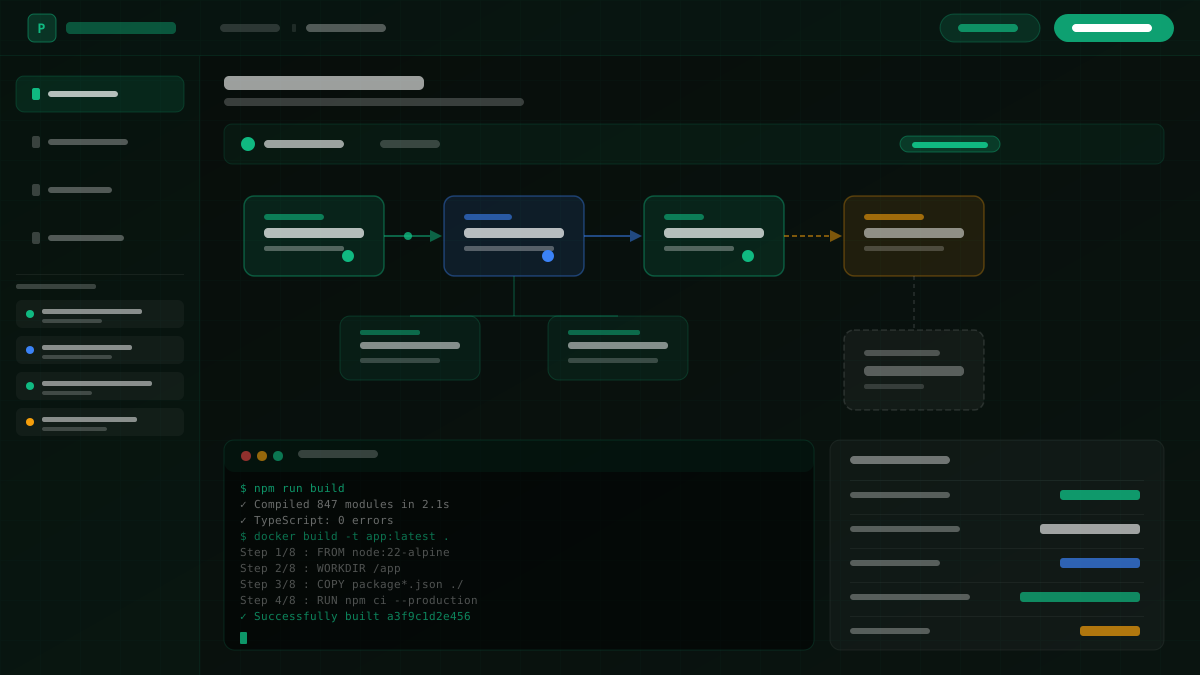
- Pipeline definitions — structured YAML that maps to a visual graph
- Live execution views — WebSocket-powered real-time stage tracking
- Deployment ledger — immutable record of every deployment action, who triggered it, what ran, and what version landed in each environment
KEY DECISIONS
Decision 1: Own the pipeline definition format, not wrap GitHub Actions
The tempting path was to be a pretty UI wrapper around existing GitHub Actions YAML. I rejected this because the root cause of most incidents was YAML that was valid but semantically wrong — tools that just render existing YAML inherit the problem.
PipelineForge has its own schema that compiles down to GitHub Actions YAML. Engineers define pipelines in PipelineForge’s format; the tool generates the Actions YAML and keeps it in sync. This means PipelineForge can validate pipeline logic, not just syntax.
Decision 2: Immutable deployment ledger in PostgreSQL
Every deployment event is written to an append-only ledger — no updates, no deletes. Each record contains: who triggered it, the exact git SHA deployed, every stage’s exit code and duration, environment variables used (hashed), and the diff from the previous deployment.
This made rollbacks trivial: you’re not “rolling back” — you’re deploying a previous ledger entry. The team went from 45-minute rollbacks to under 3 minutes.
Decision 3: WebSocket-first for the execution view
Watching a deployment in real time via WebSockets completely changed the team’s behavior around deployments. Instead of triggering a deploy and walking away, engineers started watching them. This sounds small but it caught 6 incidents in the first month before they reached production — engineers saw something unexpected in the logs and paused.
Decision 4: Auto-rollback on health check failure
After deployment, PipelineForge polls the health check endpoint of the deployed service for 5 minutes. If it fails to come up, it automatically triggers a rollback using the previous ledger entry and pages the on-call engineer. This feature alone accounts for most of the incident reduction.
THE RESULT
PipelineForge went live to the full team in month 3. The impact was measurable within the first 30 days.
At the 6-month mark:
- Deployment incidents dropped 70% — from 2-3/week to under 1 every two weeks
- Mean deployment time dropped 55% — from 28 minutes to 12 minutes (parallelized stages + eliminated manual checks)
- Rollback time: 45 minutes → 3 minutes (selecting a ledger entry and confirming)
- New engineer deployment independence went from 2-3 weeks to 3 days
- Engineering team saved an estimated 40 hours/week of deployment-related coordination overhead
- Zero production incidents attributable to pipeline misconfiguration since launch
The number I’m most proud of: the average Slack messages per deployment went from 11 to 2 (one to announce start, one to confirm done).
The CTO wrote in a company postmortem review: “We ship more often now precisely because we’re less afraid of shipping.”
WHAT I LEARNED
The tool that doesn’t get in the way wins. My first prototype had a configuration wizard with 12 steps. Engineers skipped it and used the API directly. The final product has a 3-step onboarding. Friction kills adoption, and a DevOps tool nobody uses helps nobody.
Auto-rollback needs a kill switch. On the second week after launch, an auto-rollback triggered incorrectly because the health check endpoint returned a 503 during a database migration (intentional, temporary). That false positive almost created an incident. I added a deployment flag — auto-rollback: false — for migrations. Always provide an escape hatch.
Immutable logs are a moat. Once the team had 3 months of deployment ledger data, they could answer questions they’d never been able to answer before: “How many times did service X deploy in the last quarter? What’s the average time between commit and production? Which engineer triggers the most rollbacks?” That data became a foundation for a quarterly engineering health review. The tool became more valuable the longer it ran.